132

Horse Magnifier
Welcome To The Garden
Stick Hero RPG
Astro Tycoon

Christmas Factory
Wacky Steps
Wave Rider
Fireboy and Watergirl
TB World

FNAF Help Wanted 2
Yume Nikki
2048 Rogue

Turnip Boy Robs a Bank
Sprunki Angler Durple
Dead Strike

Sprunki
Sprunki Retake
Sprunki Phase 5
Escape Tsunami Brainrots Online
Wave Rider
Bottle Hop
Ragdoll Flip
Geometry Dash
Sprunki Wenda Treatment
Sprunki Phase 3
Sprunki Phase 4
Subway Surfers
Sprunki 2026
Sprunked
Sprunki Phase 6
Sprunki Angler Durple
Sprunki Phase 9
Sprunki OC Real

LoveMoney

Sprunki Savior Treatment
Sprunki Phase 1
Sprunki Infected
Sprunki Dandy's World
Escape Road
Line Rider is a sandbox physics game where your creativity drives the experience. Players draw custom tracks to guide a sledder through a world made entirely of lines. The charm of Line Rider lies in crafting smooth, thrilling, or even chaotic tracks and watching the sledder react in realistic, physics-driven ways.
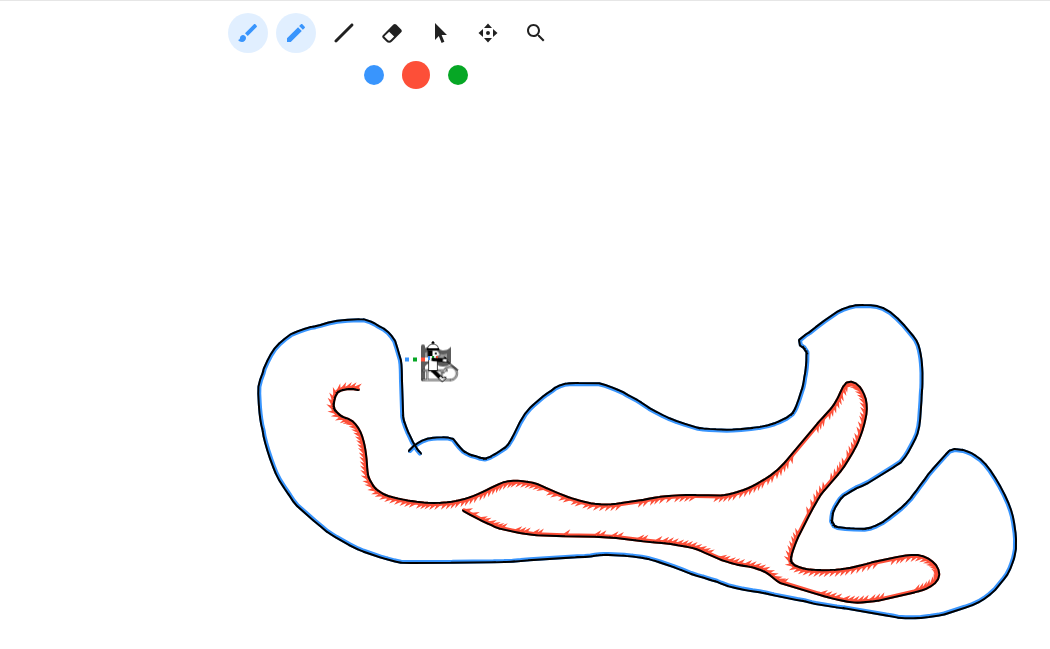
You play as both the track designer and the tester. Your character is an unnamed sledder who passively rides the paths you create. Your mission is to design a rideable and entertaining track that lets the sledder glide smoothly to the end—or sometimes intentionally crash for fun. There's no traditional goal like points or levels; your objective is to innovate and enjoy the process of building and testing.
Track Drawing: Use lines to build slopes, ramps, curves, loops, or jumps.
Physics System: Gravity affects the sledder’s motion, so steep slopes create speed, while sharp edges or gaps can lead to crashes.
Types of Lines:
Rideable Line (Blue): The sled rides on this.
Acceleration Line (Red): Increases the sledder's speed.
Scenery Line (Green): Used purely for decoration.
Sandbox Style: There are no time limits or pre-set objectives—players freely experiment with endless designs.
Mouse:
Left-click + Drag: Draw lines
Eraser Tool: Remove lines
Hand Tool: Move the canvas
Keyboard:
Spacebar: Play/Pause the sledder’s movement
Z: Undo
R: Restart the sledder from the start point
Arrow Keys: Move the camera view
Gameplay Loop:
Draw a section of the track.
Press play to see how the sledder moves.
Adjust and refine your design based on what happens.
Continue expanding your track until you create a full ride.