2.34K

Horse Magnifier
Welcome To The Garden
Stick Hero RPG
Astro Tycoon

Christmas Factory
Wacky Steps
Wave Rider
Fireboy and Watergirl
TB World

FNAF Help Wanted 2
Yume Nikki
2048 Rogue
Turnip Boy Robs a Bank
Sprunki Angler Durple
Dead Strike
Sprunki
Sprunki Retake
Sprunki Phase 5
Escape Tsunami Brainrots Online
Wave Rider
Bottle Hop
Ragdoll Flip
Geometry Dash
Sprunki Wenda Treatment
Sprunki Phase 3
Sprunki Phase 4
Subway Surfers
Sprunki 2026
Sprunked
Sprunki Phase 6
Sprunki Angler Durple
Sprunki Phase 9
Sprunki OC Real

LoveMoney
Sprunki Savior Treatment
Sprunki Phase 1
Sprunki Infected
Sprunki Dandy's World
Escape Road
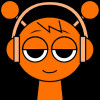
Sprikngn is a rhythm-based music game that challenges players to create and mix their music by arranging various sound loops. The game focuses on beatboxing and allows players to experiment with different sounds to produce music, similar to the popular Incredibox series. Players can drag and drop different sound elements onto animated characters, which then vocalize the beats and loops, creating a full musical composition. The game offers an engaging and fun way to explore music production, rhythm, and sound design.
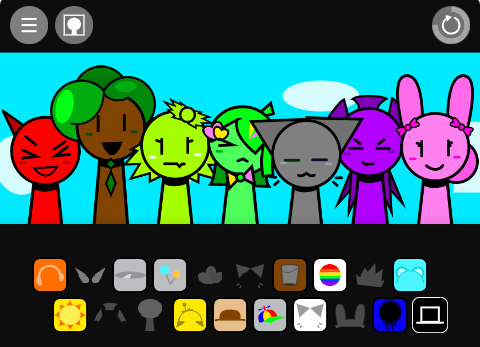
In Sprikngn, players are tasked with creating music by controlling animated characters who perform beatboxing and vocalizations. The characters each represent a specific sound or loop, such as drums, bass, vocals, or melodies. Players drag and drop different sound elements onto the characters to layer the sounds together, creating a complete musical composition. The objective is to explore different combinations of sounds to discover new beats, rhythms, and melodies. The game encourages creativity by allowing players to experiment with sounds and rhythms in a user-friendly interface.
Mouse: Players use the mouse to drag and drop different sound elements onto the characters. Clicking on each character’s icon activates a specific sound loop. You can also drag sound elements from the side of the screen to the corresponding character slots. Players can pause, restart, or adjust the mix by clicking various on-screen buttons.
Keyboard: The keyboard may be used for quick navigation and control. For instance, pressing specific keys may enable players to cycle through different sound loops or to pause the game. The keyboard layout is typically customizable in the settings to suit different preferences for controlling the game.